SQL Database
Repair Tool

  • Repair Corrupted MDF & NDF Database Files
  • Fix SQL Database Corruption Errors
  • Different Options to Export Recovered Data
  • SQL Database Repair Tool With Dual Smart Scan Modes
  • Supports Advanced SQL Data Types
  • Compatible With SQL Server 2025 and Older Versions
Preview Objects After Recovery
Features

SQL Repair Tool - Top Highlighted Features

  • Repair corrupt SQL MDF/NDF files
  • Quick Scan for Minor Issues & Advanced Scan for Severe Corruption
  • Auto-Detect the SQL Server version
  • SQL Database Repair Tool to Recover all components of SQL database
  • Provide support for the recovery of Primary/ Foreign key
  • Export large extent SQL database after repair
  • Preview deleted SQL database objects in Red color
  • Recover deleted Table, Stored Procedure, Functions, Views, Indexes
  • Repair MDF file from virus attack (Wallet Ransomware)
  • Migrate SQL database tables from one database to another
  • Support standard & user defined schemas
  • Different options to export recovered data
  • Recover data type like JSON, Vector, XML & ASCII
  • Repair MDF file of SQL Server 2025 & below versions
Resolve Issues

Repair MDF File From Any Corruption

SQL Server database can be damaged due to physical or logical corruption in the database. This might make the Server show the following types of symptoms which will help you in determining that your SQL database has been affected with corruption and needs to be repaired. This is where the SQL Database Repair Tool helps with resolving the below mentioned issues:

Symptoms of Database Corruption:
  • The SQL Server database become inaccessible
  • Hardware faulty like Disk, CPU, Controller
  • IO Susbsytem level
  • Malicious infection
  • Power outage in the middle of transaction
Recover all SQL Database Objects
  • Table
  • Triggers
  • Stored Procedure
  • Views
  • Rules
  • Functions
  • Indexes
Advanced Features

SQL Database Repair Tool Smart Features

Repair MDF & NDF File in SQL Server

SQL Repair Tool is able to repair MDF and NDF Files with all its database objects in much less time. You can recover SQL server database without any file size limitation. MDF Recovery Software repair MDF files of large sized database objects and also recover deleted records from SQL table.

Recover all SQL Database Objects

This convenient and robust SQL Database Repair Tool recovers all existing SQL database objects like Table, Triggers, Stored Procedure, Views, Rules etc. SQL repair tool is capable of recovering large sized tables. It also supports ASCII and Unicode XML datatypes. Also, this software allows the user to recover deleted SQL database objects easily.

Repair Database with Two Scan Options

SQL Repair Tool gives you dual scanning options. One is 'Quick Scan' and the other is 'Advance Scan'. Choose Quick scan, if normal level corruption persists else choose Advance scan, if you have high level of corruption.SQL recovery software scans corrupted MDF file data and if any corruption persists, the recovery process is done at the same time.

Export as SQL Database or as SQL Script

SQL Server Repair Tool provides you two different options for exporting database objects of MDF & NDF files, i.e., SQL Server Database or SQL Server Compatible script. Choose SQL Server database option to export data into Live SQL Server database or as SQL Server compatible script to export data as .sql script.

Allows Database Export in CSV Format

With the help of SQL Database Repair Tool, database administrators can easily recover SQL Server database and further export SQL table records to CSV file. This CSV file can later be used for data analysis, report generation, or further importing tables into SQL Database from server to another.

Supports to Recover Constraint Key

SQL Recovery Tool maintains the integrity of the database objects, hence it recovers and maintains the database keys(Primary /Foreign) associated with tables. Both Primary as well as Foreign Keys are supported by SQL Repair utility for recovery process and the tool ensures no structural changes occur during the repair process.

Recover SQL Advanced Data Types

SQL Server Database Repair Software is capable of supporting the Advanced data types. The tool recovers Datetime2, hierarchyid, geometry & datetimeoffset, sql_variant, geography data types. Furthermore, it also supports data types like JSON, Vector, ASCII, and Unicode XML.

Recovery from Wallet Ransomware

Sometimes the user faces unusual behaviour of the system like spam emails, unauthenticated downloads of software etc. SQL Repair Tool protects your SQL Server database by recovering your data from the Ransomware affected database files. The tool also helps recover data from SQLi affected files.

Export Only Schema or Schema and Data Both

Depending on the user's requirements, the SQL Database Repair Tool offers dual options to export data. They can export the database schema only or with schema and data both. These features help users save time and storage while exporting recovered data.

Select and Save Desired Database Objects

This MSSQL Recovery tool allows you to export only the selected SQL database objects to the desired location. This feature allows users to save time and space within the database by only exporting the required tables, indexes, functions, stored procedures, etc.

Exports as SQL Database or as SQL Script

SQL repair tool provides you two different options for exporting database objects of MDF & NDF files, i.e., SQL Server Database or SQL Server Compatible script. Choose SQL Server database option to export data into SQL Server database or as SQL Server compatible script to export data as .sql script.

Supports Latest SQL Server Version

SQL Database Repair Tool supports MDF/NDF files of SQL Server 2025/ 2022/ 2019/ 2017/ 2016/ 2014/ 2012/ 2008 R2/ 2008/ 2005/ 2000 versions. It is very feasible and can be installed on all Windows operating systems of bit 32 or 64. Hence,you can easily recover SQL database of any version.

Screenshots

How to Recover SQL Database?

Screenshots of SQL Database Repair Tool

open SQL repair tool
Install and Launch SQL Repair Tool
Select Scanning Mode
Select scanning option depending on the level of corruption. Click Auto-Detect option, if you dont know the MS SQL Server version and then Click OK.
Preview Screen
The tool offers preview for all the recovered database items.
Preview Screen
In case if you select the Advanced Scan and recover deleted option then software will display the deleted SQL objects and table records in red color.
Export Options
The tool also provides multiple options for data export. Users can either save it to Live SQL Server database or as SQL Compatible Script file or CSV File.
Difficulties

Common SQL Issues Fixed

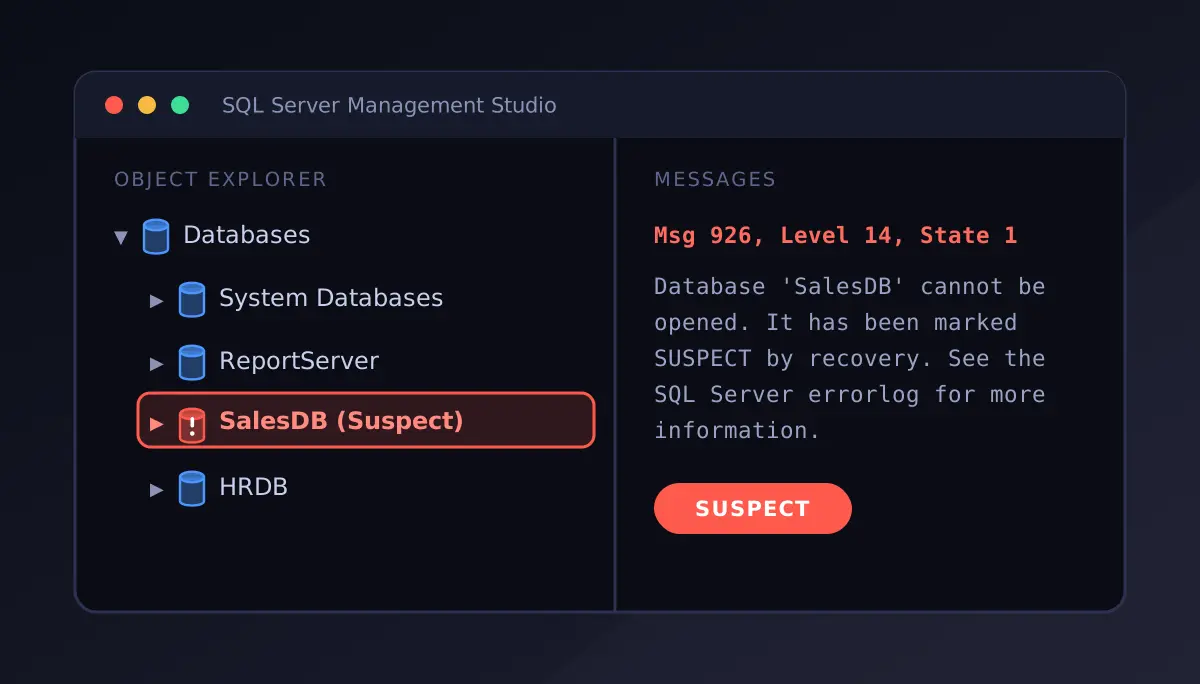
suspect db
Database Stuck in Suspect Mode

Know how to fix SQL Database in Suspect mode. When a database is marked as Suspect mode, the database engine often fails to complete the recovery process. This results in making the database inaccessible for users. The SQL Database Repair utility helps users recover the database from Suspect Mode with ease and precision.
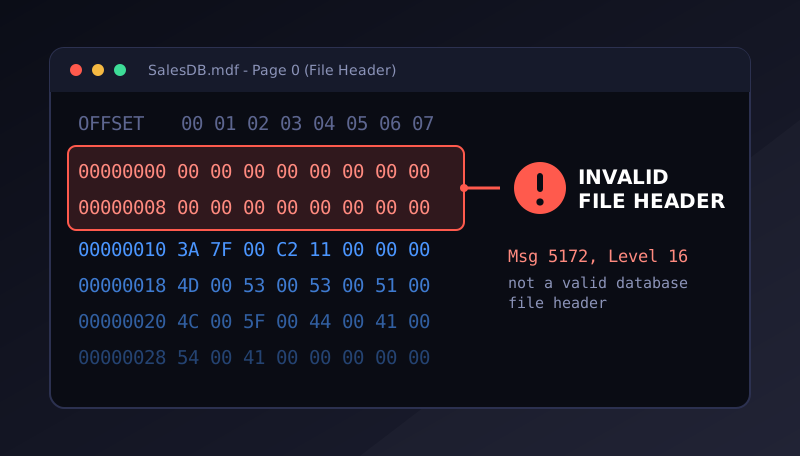
sql server error 5172
Fix SQL Server Header Error 5172

With a corrupt MDF file header, SQL Server might not recognize or open a database. This might also occur due to abrupt system shutdowns, storage failures, or due to damaged file structures. The SQL Repair Tool allows users to scan the damaged database file and recover the accessible records.
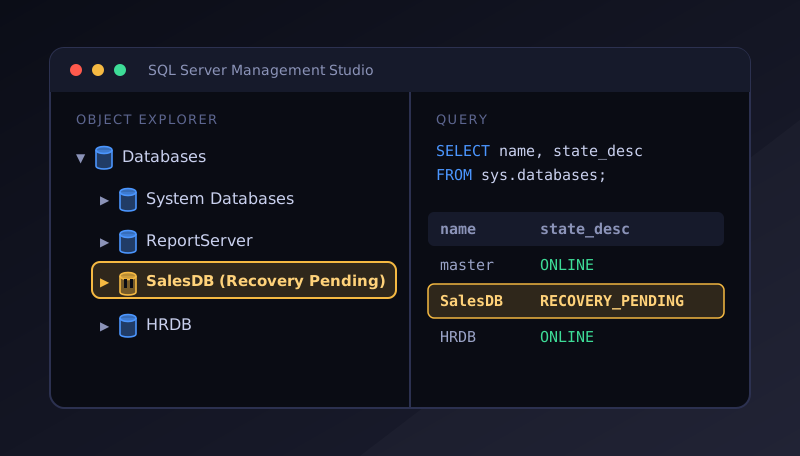
Database in Recovery Pending Fixed

Recovery Pending State in SQL Server indicates that the SQL Server engine cannot start the recovery process. With this advanced utility, users can resolve database issues causing Recovery Pending state and restore healthy data even when the database cannot be brought online using normal SQL commands.

Requirements
SQL Database Repair Tool - Software Specifications

Know the Software Requirements to Install SQL Recovery Tool Seamlessly

Usability Requirements
Supported EnvironmentSupports SQL Server 2025 & Windows 11 and its lower variants
ProcessorIntel® Core™ 2 Duo CPU E4600 @ 2.40GHz
RAMMinimum RAM required is 4 GB
Hard Disk SpaceNeed 100 MB Free Disk Space
Supported Windows EditionsWindows 10, 8, 7 (32 bit or 64 bit), Windows 11 (64 bit) & Windows Server 2025, 2022, 2019, 2016, 2012 R2, 2008
Supported SQL Server Editions2025, 2022, 2019, 2017, 2016, 2014, 2012, 2008 R2, 2008, 2005 & 2000
Pre-RequisitesMicrosoft .NET Framework 4.5 or above (Run as Administrator)
Demo ProvidesPreview of all recovered components, export of 25 records of each table & 5 other database objects.
Choose the Right Edition - Free vs Licensed
FeaturesDemoFull Version
Add SQL Primary & Secondary FilesYesYes
Dual Smart File Scan ModesYesYes
Preview Database Objects and RecordsYesYes
Save Scanned File in .str FormatYesYes
Recover & Save Data from SQL Database25 Records / TableAll Records
Export Recovered Data to SQL Server Database25 Records / TableAll Records
Export Recovered Data to CSV Format25 Records / TableAll Records
Save Restored Data as SQL Script25 Records / TableAll Records
Free DownloadBuy Now
Reviews
What Client Says about SQL Database Repair Tool?
When we encountered database corruption, we panicked because the data stored on the server was crucial for the team. Then someone recommended the SQL Database Repair Tool, and when we used this software, we were able to recover the complete data from the database. With the help of this tool, we were able to retrieve the sensitive information in very little time.
Joanna Smith, IT Consultant
My .mdf file was heavily affected by wallet ransomware infection. SQL recovery tool proves to be worth it as the software easily recovered data from .mdf database file affected by wallet ransomware. Thank you!!
John Smith, DBA
SQL recovery software becomes my saviour as it helped me in recovering deleted database records in SQL Server. Thanks to the developers!
Lily Marlizan, Data Engineer
We received an orphan MDF file and it was challenging for us to know what is stored in the file or whether it is corrupted or not. This is when we came across SQL Repair Tool. Using this software, it was easy to access the file and also recover the data stored within, irrespective of database file corruption.
Henry Steve, Senior Database Administrator
FAQs
Product FAQs
Can I repair MDF file using SQL database repair tool without installing SQL Server on my system?
Yes, SQL recovery software easily repair corrupt mdf file without SQL Server environment. But to save the data in SQL Server database, you need to install SQL Server.
Is there any file size limitations to repair corrupt SQL database using SQL Recovery Tool?
No, SQL database recovery software does not impose any file size limitation to repair corrupt MDF file. It can recover the SQL Server database of any size.
I am facing SQL Error 945. Can I be able to repair suspect database using SQL database recovery tool?
Yes, SQL Database Repair Software is capable to recover SQL database from Suspect mode.
Can I repair corrupted SQL database of version 2025 using this SQL Database Recovery tool?
Yes, SQL Repair Tool can recover SQL Server database of 2025 & all legacy versions
Perform the following steps to repair mdf file using SQL recovery tool:
  1. Install and run the tool
  2. Click on "Open" then select and add corrupted MDF file
  3. Select scanning mode, Quick or Scan and select MDF file Version
  4. Software will start scanning MDF file and repair MDF file quickly
  5. Preview all the repaired items of MDF file
  6. Click on "Export" to save the repaired items.
Is it possible to convert .mdf to .sql script file using SQL Database Recovery Tool?
Yes, SQL repair tool is capable to convert .mdf to .sql script files.
Is it possible to repair .mdf file without knowing its version?
Yes, SQL Recovery Software has an 'Auto-Detect' feature which automatically detect the .mdf file version. By enabling it, software will detect the version and recovers its data.
Is it possible to repair .mdf file, which has been affected from wallet ransomware using SQL database recovery tool?
Yes, The strong inbuilt functionality of SQL database repair can recover SQL database from any virus attack.
I have to migrate data from one database to another. Can the SQL Recovery Software help with migration?
Yes, this smart utility is capable of transferring data from one database to another database in SQL Server.
Can I recover deleted records in SQL server using SQL Repair Tool?
Yes, the tool recovers deleted records from SQL Server database tables. This user can preview the deleted SQL table records in red color.
Recover SQL Server Database Seamlessly

Repair corrupt MDF and NDF database files, recover records from inaccessible databases, and restore a complete database with the advanced SQL Database Repair Tool.

Keep Calm and Repair Database in Suspect Mode

Problem

I have been giving solution to various forums and found that the Database in Suspect Mode is one of the common problem user or DBA faces.

The database becomes inaccessible to the user and user is not able to perform any operation to the SQL database. This is the worst situation any DBA could face and he need to bring that database in normal mode as soons as possible.

First of all Don’t Panic. We are here to help you in recovering database from Suspect Mode.

I will show you how to create SUSPECT database and then recover it from two different methods. Both process will be done in front of you practically. You can pick the best solution to repair your database from Suspect mode.

Solution

Finding the Root Cause?

If you want to find out the root cause of the issue, then check your SQL Server error logs. Error logs will give you the clear picture of the database and give you the exact reason why database get in to the Suspect mode.

Use Filter while viewing SQL log and use Database name as filter criteria. From this, you will be able to see the logs relating the particular database. To find the root cause.

Reasons?

Might be possible that your database goes in Suspect Mode due to accidental deletion of log file when SQL Server is offline, may be Exclusive lock placed on data or log file due to Antivirus, corruption in Transaction, corruption in data file or any Hardware/OS level failure. The reason could be many but these are the common reasons any SQL user faces while having Database in Suspect Mode.Now, you are aware of the reason and you need to take quick action to recover the database from Suspect mode.

Creating Suspected Database:

Step-1 I am going to create database Test_Db and going to make it Corrupt.

Step-2 Now ,shut down the SQL Server and Turn off the services.

Step-3 Open HexEditor and load Test_Db.mdf file to the editor.

Step-4 Make changes to the strings of Test_Db.mdf file and Save them

Step-5 Now Start the services of SQL Server and Open SQL Server

Step-6 When you Open the SQL Server and make Use of database Test_Db you will get the following error. You check the status of SQL Server by using DATABASEPROPERTYEX.

SQL Error 945 means the database get into the Suspect Mode.

Now the next step is to Detach the database. How would you do it?

Step-7Detach it by using sp_detach_db as executed on the below screenshot.

Step-8Set the database offline and Copy the database files as a backup. Now Drop the database .

Your database is successfully Detached from SQL Server.

Step-9Now,Reattach SUSPECT Database by sp_attach_db.

Run following command:

EXEC sp_attach_db @dbname = N'Test_Db',
    @filename1 = N'C:\Program Files (x86)\Microsoft SQL Server\MSSQL10.MSSQLSERVER\MSSQL\DATA\Test_Db.mdf',
    @filename2 = N'C:\Program Files (x86)\Microsoft SQL Server\MSSQL10.MSSQLSERVER\MSSQL\DATA\Test_Db_log.ldf';
GO

You will get SQL Error 5172. The error arises when header information of .mdf file gets corrupted.

Step-10Create a new log file by using ATTACH_REBUILD_LOG.

Now create a test dummy database and apply same process to this. Set the database Offline.

If incase you forgot to delete corrupted files then you will get the error shown above.

Now check the status of that database.You will get the database in Suspect Mode.

How to Repair Suspect Database

Well if you dont have backup then the only option you have is to set the database in Emergency Mode. Emergency mode help you to let in to the database. It does not means that your recovery is completed.

Put the database in Emergency Mode and Single_user mode

Try regular ATTACH_REBUILD_LOG and incase, if it get fails, then go for DBCC CHECKDB.

"Note: Choose REPAIR_ALLOW_DATA_LOSS as a last resort." 

Check the status and you will get the status Online.

What if it get Fails in Repairing SQL Server database?

Well I am quite happy that I am the lucky one, my database get repaired successfully in one shot. But!! its not pretty easy, you have to be very carefull. As you see the DBCC should be taken as a last resort, data might get lost while repairing database in Suspect Mode.

The best strategy you can opt to recover it quickly is Having good BACKUP STRATEGY! So that you can quickly restore from the last backup.

But what if you are in worst situation?

Having No Backup? Failed in recovering SUSPECT database?

Make Savvy Move!

SQL Repair tool will help you out. Just load your corrupted MDF file and attach to this tool. Want to know how? See here;

Conclusion

Database in Suspect Mode is one of the scariest scenario any SQL user or DBA faces. Why? Because the database becomes inaccessible. So, here we have tried to give you the scenario by creating database in Suspect mode and repair it manually. We have tried to figure out the root cause, why database goes in Suspect state. We have also discussed various possibilities of getting SQL error 945. The blog also covers an automated approach to repair Database in Suspect Mode. We have tried to give you best possible solution by resolving it in real-time scenario.

SQL Server Header Corruption: Error 5172

Header Corruption in SQL Server? I have seen number of forums resulting the SQL Server error 5172. It is one of the most common query user faces in SQL databases. Error message looks like:

Well this error mainly result when your MDF File got corrupted. Other possibility of getting this error is when you try to attach MDF or LDF Database from the existing database to the new system. Or you are trying to attach the high version of database to lower version.

Here I am going to tell you the solution on how to fix SQL Server header error 5172.

What will I do?

Let us discuss what I am gonna do? I am going to create the database and make it corrupted resulting SQL Server header error 5172 and then repair it.

Fix SQL Server Header Error 5172 - Let get started!

What Happens to the database and What it Indicates:

First of all, you can check this in SQL ERRORLOG also. It will give you the complete description of the database. The message indicates the serious corruption in the header which SQL Server is not able to understand. As a result, SQL will not be able to get started, hence the database becomes inacessible.

Possible Options You have?

Since your database is corrupted, you can try the two possible solution

So we have discussed the two possibilities you can do while having SQL Server error 5172.

Fix SQL Server error 5172 Without any Data Loss

Let’s get started

I am going to show you the sure shot solution to fix SQL Server error 5172. I am using SQL Recovery tool to repair SQL Server error 5172.

Conclusion

The blog is for all those user who are facing SQL Server header error 5172. I have created a scenario in which I created SQL Server error 5172 and repair it in possible way. Choose any of the option wisely !

How to Convert MDF to SQL File

“In today’s arena the most common query is how can I convert MDF to SQL file for free? As there are no such details provided over the internet to fix this unanswered puzzle. So today, with this article I am going to discuss two different ways to easily convert MDF files into SQL script of SQL Server database.”

Quick Glance on SQL Server and MDF File

SQL Server is a relational database management system in the technology field. It is compatible with more than one transactions processing. Master database file (MDF) and Log transaction files (LDF) are the main files used by SQL Server for storing the database contents. Due to the functionalities it facilitates, it has become one of the sought-after programs. MDF is a foremost database file of SQL Server is used to save components like views, stored information etc. A user is unable to open the MDF files which ultimately provides a complete security on data breaching and much more. Sometimes, the user wants to convert their MDF to SQL file. We come up with appropriate ways to do same.

Why user Export MDF to SQL File?

There are several reasons behind the MDF to SQL file conversion. Mainly, we describe some of them have a look:

  1. By migrating .mdf file to SQL script, a user can use these files to multiple servers.
  2. Due to this fact that MDF file become unreadable. A user cannot open, read and view their .mdf files. Than, there is only one way to read or open MDF files is by converting it into SQL scripts.
  3. Often times, users attach MDF files to the database by some untrusted sources, which may result in error as it could includes malicious information. So execute these scripts on SQL Server so that we can convert MDF to SQL file.

Effortless Way to Convert MDF to SQL File Without Any Hindrance

The above-mentioned manual solution is very cumbersome and complex to the non-technical user. So, it is better to switch on the third-party tool such as “SQL Repair Tool”. With the help of this tool a user can easily convert .mdf to SQL file without any data loss. This utility facilitates an understandable interface so, a novice user can also perform the conversion without taking an expertise help. The tool is equipped with advance technologies that supports ASCII and Unicode both XML data types. Software recovers SQL Server 2019, 2017, 2016, 2014 and below database files versions.

Guide to Perform MDF to SQL File Conversion

Final Word’s

Most of the database admin tasks can be performed through SQL scripts. Throughout this article, we have gone through the super instant tips to convert MDF to SQL file. And discussed basic steps to perform the conversion manually also. User can opt any method as per their desire.